JavaScript Variables
Written By: Avinash Malhotra
Updated on
Quick Overview: In this comprehensive JavaScript variables tutorial, you'll learn how to declare and use variables with var, let, and const keywords, understand variable hoisting and scope management, and master best practices for modern JavaScript development.
Variables in JavaScript
A variable is a container or storage area used to store data values in your computer's memory. When you create a variable in JavaScript, you use one of three keywords: var, let, or const. These are reserved keywords in JavaScript that tell the engine you're declaring a new variable. While you can technically create variables without any keyword in sloppy mode, it is not recommended, especially as per strict mode requirements.
JavaScript variables are loosely typed, also called dynamically typed. This means a single variable like var x can store any type of data at different times: strings, numbers, functions, booleans, undefined, null, arrays, or objects. This is unique to scripting languages like JavaScript. In contrast, languages like Java, C, and C++ are strictly typed (or statically typed), requiring you to declare the data type when creating a variable.
Earlier JavaScript was a scripting language, but now it's a general-purpose programming language with Runtime or JIT Compilation, but still variables are loosely typed.
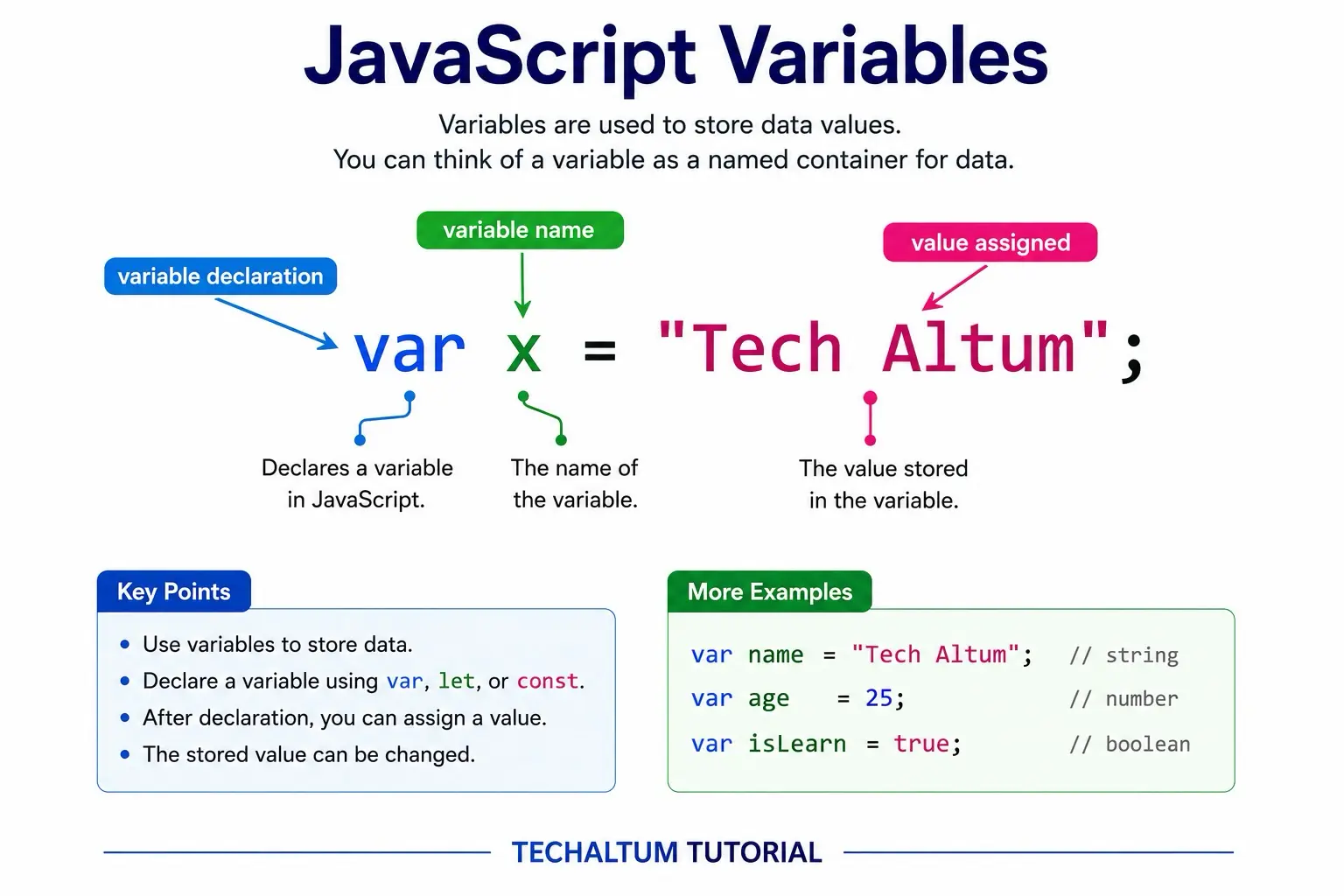
Variables are always initialized first with var, let or const keyword.
For example, var x means a variable named x is initialized.
To assign a value to a variable, = (assignment operator) is used, followed by the value.
How to Declare Variables in JavaScript
Variables Declaration in JavaScript is very easy. We can directly declare variables without class or function.
<script>

var x="Tech Altum";    // value of x is "Tech Altum"

let y=9;               // value of y is 9

const pi=3.14;               // value of pi is 3.14

let a=2, b=3, c=5;     // multiple variables in single line

let u;                 // u is undefined

</script>
Change a Variable's Value
To change the value of an existing variable, assign a new value without using var, let, or const. Never repeat the declaration keyword for an existing variable; only use the variable name.
var x="hello";
console.log(x);        //  "hello"

x="hola";
console.log(x);        // "hola"
var keyword is used to declare a variable. To change value of variable, there is no need to use var keyword again, only variable name is enough.
Variable Naming Convention in JavaScript
To declare a variable in javascript, there are some rules. Here are some rules used to declare variables names in javascript.
- variables names cannot include javascript reserved keywords, like var, let, const, for, in, while, true, false, null, class, let, const, function etc.
- Variables names cannot starts with numbers or hyphen, use alphabets, underscore(_) or dollar ($).
- variables can have strings followed by numbers, like x1 and x2 are allowed but 1x, 2x is not allowed.
- For separation in variable names, use underscore (_) or camel casing, do not use hyphen (-) separation and white space, i.e, user_name is valid, username is also valid, but user-name is invalid.
- Variables names are case sensitive; for example, x1 and X1 are different.
JavaScript Strict Mode
ECMAScript 5 includes strict mode in javascript. "use strict" string is used to follow strict mode. In strict mode, var is compulsory, but in sloppy mode, we can also create variables without var keyword.
It is recommended to use strict mode for faster Compilation and to avoid runtime errors.
How to use strict mode?
To use strict mode in javascript, type "use strict"; just after script opening tag. The remaining code will be after "use strict", like variables declaration, print etc.
<script>
"use strict";

</script>
Strict Vs Sloppy javascript
Strict mode
var x=3;
var y=10;
- var compulsory
- octal literal not allowed
Sloppy mode
x=3;
y=010;
- var optional
- octal literal allowed
Always preferred strict mode in javascript.
JavaScript Sloppy Mode
By default javascript is written in sloppy mode. Sloppy mode allow us to create a variable with or without var keyword.
<script>
    var x1="tech altum";       	 // allowed
    x2="javascript";        	 // also allowed
</script>
Sloppy mode is not preferred now. It can create runtime errors and perform slow.
Variable Hoisting
JavaScript Hoisting is the process to move all variables and functions expressions to the top of code block or scope before execution. Variable Declaration is hoisted, but variable assignment is not hoisted. This means, a variable x declared at any point can have undefined value before assignment, but after assignment, variable value can be string or number defined.
When we declare a variable says x, the name of variable is stored in memory. That's why its loaded at top of code block. We can even print variable before initialization, but it will print undefined.
During execution of code, variable x will get its value. So we can print value only after execution.
This rule is not the same for let and const. They have temporal dead zone.
undefined
hello js
<script>
console.log(x);       // return undefined

var x="hello js";

console.log(x);        // return "hello js"
</script>
Reason for variable declaration? 🤔
The assignment operator (=) is responsible for variable hoisting in javascript. Before code execution, variable names are stored in memory. The left-hand side of equal to (=) stored variable name before execution. During code execution, variable value on right hand side is assigned. That's why we can only check variable name before assignment. But after assignment only, we can get the value of variable.
It is recommended to declare variables and assign values at the top to avoid variable hoisting issue. This issue is not with let and const as they are strict.
JavaScript Scope: Local vs Global Variables
A variable in javascript can be local or global variable based on its scope. Variables declared outside function are global variables and variable declared inside function are local variables.
Global Variables
Variables declared outside function are global variable. Global variables have global scope. This means, a variable in <script> tag is by default global. Global Variable once declared can be used anywhere, even inside a function.
Global Variables Example
hello js
88
var x="hello js";        // global variable
var y=88;                // global variable

function myFunction(){
    console.log(x)           // returns "hello js"
    console.log(y);          // returns 88
}

myFunction();
Local Variables
Variables declared inside functions are local variables. Local Variables have local scope. This means they are accessible only within their function block, not outside.
Local Variables Example
local variable
local variable
Error
Error
function myFunction(){

var x="local variable";
var y="local variable";

console.log(x); // valid
console.log(y); // valid
}

myFunction()

console.log(x); // invalid
console.log(y); // invalid
global Variables in function
recommended way
local
global
Error
global
var y;
function myFunction(){
var x="local";
y="global ";

console.log(x); // valid
console.log(y); // valid
}

myFunction()

console.log(x); // invalid
console.log(y); // valid
not recommended
local
global
Error
global
function myFunction(){
var x="local";
    y="global ";

console.log(x);// valid
console.log(y);// valid
}

myFunction()

console.log(x); // invalid
console.log(y); // valid
JavaScript Block Scope: let and const
let and const were introduced in ECMA 6. let is used to declare temporary values within block scope, inside {} . Whereas const is used to declare permanent values, which can't be change. Like value of pi, e, G and other constants.
Scope of var is global or local.
JavaScript let Keyword
JavaScript let is used to declare variable in block scope. The value of let is only accessible inside block. Also let naming is not hoisted like var. So let can be used only after declaration.
let if used before initialization throw error because of temporal dead zone.
<script>
{
    let x="user";  // block scope
}
</script>
let vs var
<script>
var i=2;            // global scope

if(i==2){
    let i=3;            // block scope
    console.log(i);     // 3
}

console.log(i);         // 2
</script>
JavaScript const
JavaScript const is used to declared immutable values within a block. const value is not changeable. Use const for values li pi which is a constant.
<script>
    const pi=Math.PI;    // pi is a const
</script>
<script>
const user="avi";

user="xyz";  //Assignment to constant variable.

</script>
var vs let vs const
var is function scoped, but let and const are block scoped. let and const are replacement of var in JS ES6 and onwards. Here is table of comparison of var, let and const.
| Property | var | let | const |
|---|---|---|---|
| hoisting | declaration | temporal dead zone | temporal dead zone |
| Reinitialize | yes | no | no |
| reassign value | yes | yes | no |
| Scope | Function | block | block |
| Create global property | yes | no | no |
- Although it is not compulsory, but its always recommended to use strict mode.
- let and const are supported in all modern browsers: Edge, Firefox 36+, Chrome 21+, Safari 5.1+, and latest versions of all major browsers.
- For maximum compatibility with modern web standards, always use let or const instead of var.
What is the difference between var, let, and const in JavaScript?
var is function-scoped and hoisted, let and const are block-scoped with temporal dead zone. let allows reassignment but const doesn't. var creates a property in the global object, let and const don't. Modern JavaScript recommends using let or const instead of var.
What is variable hoisting in JavaScript?
Variable hoisting is JavaScript's behavior of moving variable declarations to the top of their scope before code execution. Only the declaration is hoisted, not the initialization. With var, you get undefined before assignment; with let and const, you get a ReferenceError (temporal dead zone).
What is strict mode in JavaScript?
Strict mode is a restricted variant of JavaScript that requires all variables to be declared with var, let, or const. It improves performance, prevents unsafe actions, and changes how this is handled. Enable it with "use strict"; at the beginning of a script or function.
What is the difference between local and global variables in JavaScript?
Global variables are declared outside functions and accessible everywhere in your code. Local variables are declared inside functions and only accessible within that function's scope. Using local variables prevents naming conflicts and improves code maintainability.