Geolocation API
Written By: Avinash Malhotra
Updated on
Geolocation
JavaScript Geolocation or HTML5 Geolocation API is a client-side API used to get the user's physical location using geographical position or GPS location via device location sensors. Geolocation returns coordinates like latitude, longitude, and accuracy. If the device supports a barometer sensor, we can also get altitude and altitude accuracy. For moving devices, we can also get direction and speed.
Previously, IP -based location was used, but now geolocation is more popular as it is more accurate. Since geolocation relates to user privacy, the browser will first request permission.
Geolocation Permission
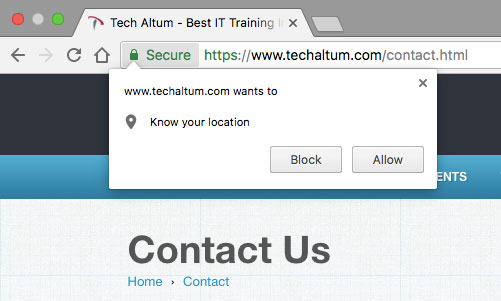
Getting the user's physical location falls under user privacy. The HTML5 Geolocation API will always request permission from the user to access geolocation. If the user allows it, geolocation will work; otherwise, geolocation will be blocked.
Once geolocation is allowed, the browser saves this setting and allows geolocation every time the user visits the same website, or for one day in Safari. However, the user can block geolocation for the same website in browser settings.
Geolocation Permission Popup
To allow geolocation access, you need to give permission to both the browser and the website. There will be a notification to allow geolocation just below the URL bar.
Check Geolocation
Geolocation is supported on https protocol & HTML5-based browsers only. For development purposes, Chrome allows geolocation in file protocol and localhost (i.e., 127.0.0.1). IE 8 and below do not support the HTML5 Geolocation API.
For Production purpose, use https protocol.
<script>
    if(navigator.geolocation) {
        console.log("geolocation supported")
    }
    else{
        console.log("geolocation not supported")
    }
</script>
Geolocation Methods
There are three methods of the navigator.geolocation object to get, watch, and clear geolocation. You need to give permission to allow the web browser to trace geolocation from the operating system.
Get Geolocation
To get geolocation, use the navigator.geolocation.getCurrentPosition() function. This function can take one or two parameters. These parameters are callback functions for success or error.
The first parameter is a callback function that invokes if geolocation is allowed.
The second parameter is another callback function that invokes if geolocation is not allowed or an error occurs.
getCurrentPosition with success callback
navigator.geolocation.getCurrentPosition(successCallback);
getCurrentPosition with both success and error callback
navigator.geolocation.getCurrentPosition(successCallback,errorCallback);
getCurrentPosition with options
navigator.geolocation.getCurrentPosition(
    successCallback,
    errorCallback,
    {
        enableHighAccuracy:true,
         timeout:10000,
         maximumAge:30000
    });
Success Callback
Success Callback returns a GeolocationPosition object. The GeolocationPosition object includes coordinates of the geolocation. There is also another property called timestamp that returns the time when the location was available.
GeolocationPosition {coords: GeolocationCoordinates, timestamp: 1697952365680}
navigator.geolocation.getCurrentPosition(x=>{
    console.log(x);
});
Coords
The Coords object includes coordinates. Coordinates are defined in latitude and longitude. There is also an accuracy property for the coordinates.
GeolocationCoordinates {latitude: 28.7825303, longitude: 77.3528988, altitude: null, accuracy: 13.243, altitudeAccuracy: null, …}
    navigator.geolocation.getCurrentPosition(x=>{
        console.log(x.coords);
    });
Coordinates Properties
The first callback function (success) has a parameter (e.g., positions). positions has a property coords. Now positions.coords calls the geolocation properties. Here are some properties of geolocation coords.
Latitude
Latitude is the degree north or south from the Equator. For the Northern Hemisphere, latitude is always positive, and for the Southern Hemisphere, it is negative, ranging from 0 to 90 degrees.
Longitude
Longitude is the degree east or west from the Prime Meridian. For the Eastern Hemisphere, longitude is positive, and for the Western Hemisphere, it is negative, ranging from 0 to 180 degrees.
Accuracy
Accuracy is the accuracy in meters for latitude and longitude.
Altitude
Altitude is the altitude in meters above sea level or null.
Altitude Accuracy
Altitude Accuracy is the accuracy in meters for altitude or null.
| Property | Value |
|---|---|
| latitude | in degrees |
| longitude | in degrees |
| altitude | in meter |
| accuracy | in meter |
| altitudeAccuracy | in meter |
Geolocation Example
Get Geo Location
| Property | Value |
|---|---|
| latitude | |
| longitude | |
| accuracy | |
| altitude | |
| altitudeAccuracy |
<script>

navigator.geolocation.getCurrentPosition(success,error);

function success(pos){

    const lat=pos.coords.latitude;
    const lon=pos.coords.longitude;
    const acc=pos.coords.accuracy;

console.log(`Latitude is ${lat}, longitude is ${lon} and accuracy is ${acc}`);

}


function error(err){
    console.warn("Error " + err.message);
}

</script>
Watch Position
For moving devices, the properties will change. Even if accuracy changes after some time, we cannot get the new properties using the getCurrentPosition method.
To resolve this, use the navigator.geolocation.watchPosition() method. This method is used the same way as navigator.geolocation.getCurrentPosition(). See the example below.
| Property | Value |
|---|---|
| Latitude | |
| Longitude | |
| Accuracy | |
| Altitude | |
| Altitude Accuracy | |
| Heading (in deg, 0 for north) | |
| Speed ( in m/s) |
    navigator.geolocation.watchPosition(success);

    function success(positions){

        const lat=positions.coords.latitude;
        const lon=positions.coords.longitude;
        const acc=positions.coords.accuracy;
        const alt=positions.coords.altitude;
        const altAcc=positions.coords.altitudeAccuracy;
        const head=positions.coords.heading;
        const speed=positions.coords.speed;

        console.log("Latitude is " + lat+ ", longitude is  "+ lon + " and accuracy is " + acc );
    }
Clear Watch
clearWatch method of navigator.geolocation is used to clear watching geolocation by the browser. To do this, we have to pass an argument to the clearWatch method.
   // start watch
    const geo=navigator.geolocation.watchPosition(success);

    function success(positions){

        const lat=positions.coords.latitude;
        const lon=positions.coords.longitude;
        const acc=positions.coords.accuracy;
    }

    // clear watch

    navigator.geolocation.clearWatch(geo);
Weather Api
In this example, we will learn how to check local weather using the geolocation API. We are using the free API from https://openweathermap.org/ for weather updates.
To get a free API key, log in to https://openweathermap.org/ and register for free.
You can also use weatherapi.com to get free api.
document.querySelector('button').addEventListener("click",function(){

    navigator.geolocation.getCurrentPosition(done,error);

    function done(x){
    const lat=x.coords.latitude;
    const lon=x.coords.longitude;
    const apiKey="abcdefgh1234";
    const url=`https://api.openweathermap.org/data/2.5/weather?lat=${lat}&lon=${lon}&APPID=${apiKey}&units=metric``

    fetch(url)
    .then(i=>i.json())
    .then(i=>console.log(i));
    }

    function error(x){
    console.log(x.message);
    }
});
Google Map Direction API
We all have used Google Directions in Google Maps. Let's create the same Direction API using HTML5 Geolocation and Google Maps.
<button onclick="getLocation()"> Get Direction </button>
<script>
function getLocation(){
    navigator.geolocation.getCurrentPosition(showPosition,showError);
}

function showPosition(position)
  {
  let lat=position.coords.latitude;        // latitude position
  let lon=position.coords.longitude;       // longitude position
  let acc=position.coords.accuracy;        // longitude accuracy in meters

   window.open("https://www.google.com/maps/dir/" + lat + "," + lon + "/Tech+Altum, +Noida,+Uttar+Pradesh+201301,+India/@28.585731,77.1751928,12z/data=!3m1!4b1!4m8!4m7!1m0!1m5!1m1!1s0x390ce45eed7c8971:0xcbb6c33c43ba8f02!2m2!1d77.313203!2d28.582582");
  }

function showError(error)
  {
  switch(error.code)
    {
    case error.PERMISSION_DENIED:
    alert("User denied the request for Geolocation.")
      break;
    case error.POSITION_UNAVAILABLE:
    alert("Location information is unavailable.")
      break;
    case error.TIMEOUT:
      alert("The request to get user location timed out.")
      break;
    case error.UNKNOWN_ERROR:
      alert("An unknown error occurred.")
      break;
    }
  }
</script>
- Geolocation is not permitted on the http protocol now. Make sure your site uses an SSL certificate, i.e., https.
- For better accuracy, turn on device location sensors or GPS.